
This article explains what the free version of Hadiya Gift Builder includes and what Pro adds, how to activate and manage your license, and how the “Hadiya Pro theme + Gift Builder Pro” bundle works.
Free vs Pro
The free version is enough for a store that really sells gifts: wrapping, the card, the recipient, the delivery date, and a one-size “build your gift box” builder, all working with any theme. Pro adds depth and tools that raise the order value.
| Feature | Free | Pro |
|---|---|---|
| “Make it a gift”, gift wraps, the card message (from, to, text) | ✔ | ✔ |
| Gift for someone else with recipient details, and a delivery date (working days and lead time) | ✔ | ✔ |
| Hide the price from the recipient, and “don’t call the recipient” | ✔ | ✔ |
| Prepayment for gifts delivered straight to the recipient | ✔ | ✔ |
| Gift details in the cart, order, emails and My Account, plus the daily delivery reminder | ✔ | ✔ |
| Box builder: one size, fixed or per-item pricing, surcharges for premium items | ✔ | ✔ |
| Occasions and recipients with their browse blocks | ✔ | ✔ |
| Automatic placement on the product page, shortcodes, Elementor widgets | ✔ | ✔ |
| Wraps per product or category, wrap scope, the “Best seller” badge | ✔ | |
| Card designs, suggested messages per occasion, engraving | ✔ | |
| Time slots, holidays, same-day cutoff, and the delivery bar | ✔ | |
| Box with multiple sizes, hybrid pricing, quantity discounts, steps, share links and free gifts | ✔ | |
| Ready-made gifts and the gift finder | ✔ | |
| Quick order form with cash on delivery | ✔ | |
| Printing greeting cards, packing slips and shipping labels | ✔ | |
| Perfume notes and size guide | ✔ | |
| Demo import | ✔ |
Activating your Pro license Pro
- Install and activate Pro, as in “Getting started”.
- The activation screen appears. Paste the license key from your purchase email and click Activate License.
- Open Hadiya → Licensing and check that the status reads “Your Pro license is active and valid.”
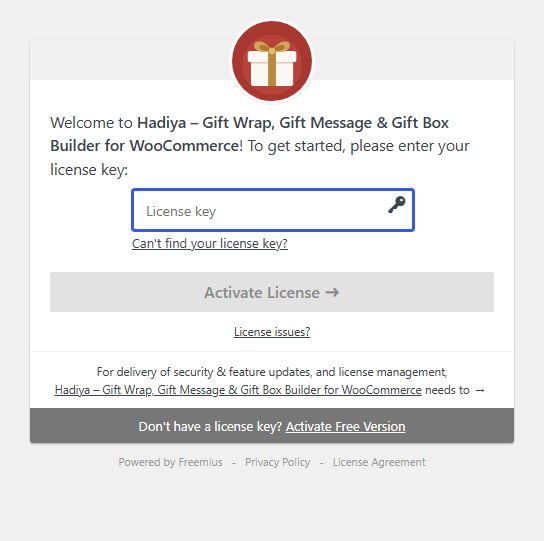
Local sites (localhost, .local, .test) don’t use up an activation from your license.
The Licensing screen
Hadiya → Licensing shows the status, the expiry date and the number of activated sites. On the free version it has an Activate your license button if you already have a key, and an Upgrade to Pro button.
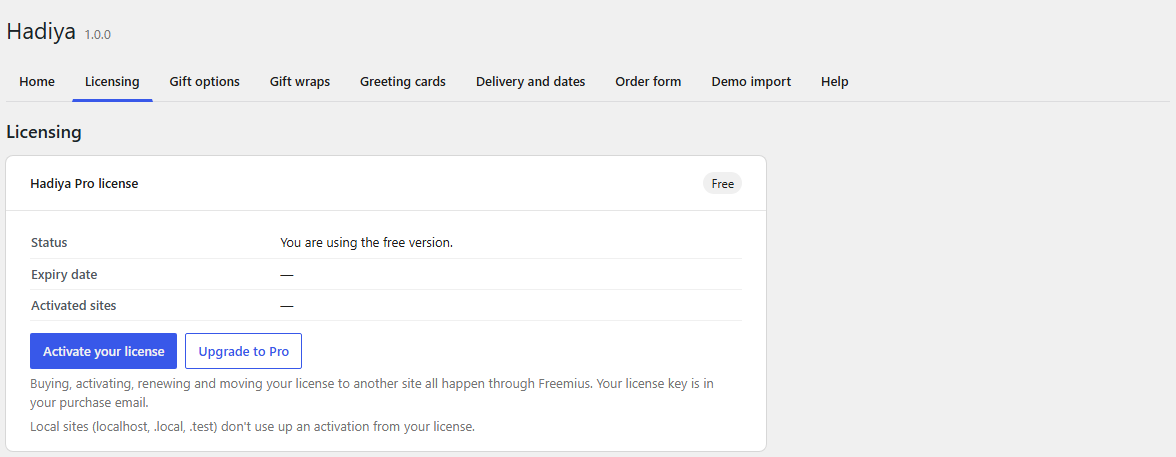
Buying, renewing and moving your license to another site all happen through Freemius. To move a license, deactivate it on the old site from this screen, then activate it on the new one.
The theme and plugin bundle Pro
If you bought the “Hadiya Pro Theme and Gift Builder” bundle, one key activates both:
- Activate the key in the theme from Appearance → Hadiya, and the plugin’s Pro features turn on automatically, with “Your Pro license is active and valid.” on the Licensing screen.
- Or activate it in the plugin directly from Hadiya → Licensing.
A Hadiya Pro theme license on its own (not the bundle) unlocks demo import only. The plugin’s other features stay on the free version.